Before → After
Product Photos
Replace plain backgrounds, improve lighting, and create campaign-ready product scenes from an existing photo.
Upload an image and describe the change you want. Remove objects, replace backgrounds, restyle scenes, and create polished visual variations with an online AI image editor that works from plain-language prompts. Sign in to receive three free credits and create your first edit.
Image
0/5Sample
Explore sample images

Before → After
One reference image can become a new product campaign, portrait treatment, or interior concept while preserving the visual details that matter.
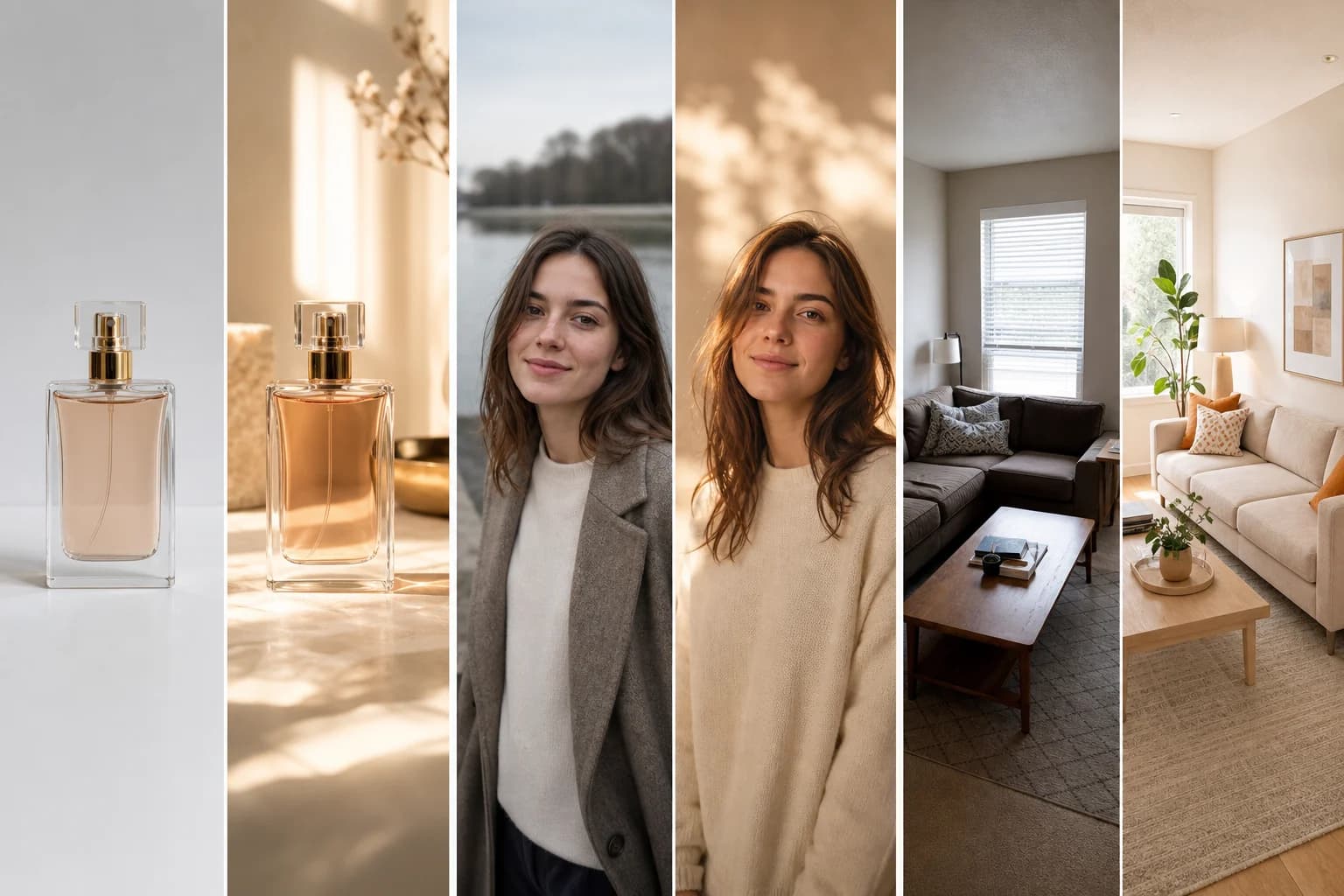
Before → After
Replace plain backgrounds, improve lighting, and create campaign-ready product scenes from an existing photo.
Before → After
Change the setting, mood, styling, or color grade while keeping the person and important facial details recognizable.
Before → After
Explore materials, furniture, lighting, and design directions while preserving the original room layout.
Before → After
Create thumbnail concepts, campaign variations, and platform-ready visuals from the photos you already have.
Before → After
Build new ad concepts, seasonal scenes, and branded visual directions without starting every asset from a blank canvas.
Before → After
Develop illustrations, character concepts, and style explorations from sketches, photos, or previous AI-generated images.
AI editing features
Make focused changes with a prompt, compare multiple models, and keep control over the references, ratio, resolution, and number of results.
Describe what to add, remove, replace, or restyle. The AI image editor applies the instruction while using your upload as the visual reference.
Upload up to five JPG, PNG, or WebP files to guide a composition, preserve a subject, or combine visual ideas in one edit.
Switch between seven image models for fast iterations, detailed edits, stronger instruction following, or a specific visual finish.
Tell the AI image editor which object should disappear or what should replace it, without rebuilding the entire composition by hand.
Move a subject into a new setting, clean up a product backdrop, or change the lighting mood while keeping the main image recognizable.
Turn photos into illustrations, campaign concepts, or new visual styles while preserving the subject, layout, and details you want to keep.
Seven AI models
Switch models without changing tools. Start with speed and low credit use, or choose more detail, resolution, and instruction control when the edit requires it.
A fast, low-credit choice for everyday generation and editing.
Choose it for stronger consistency, more detail, and output up to 4K.
Built for high-fidelity edits, accurate text, and polished 4K output.
Excels at precise instructions, visible text, and output up to 4K.
Designed for polished, photorealistic images with crisp visual detail.
A strong creative option for high-quality generation and flexible edits.
Fast, affordable generation and editing for everyday creative work.
Upload one or more reference images.
Choose the AI model for your edit.
Describe exactly what should change and what should stay.
Generate, review, and download the finished result.
Testimonials
An AI Image Editor changes an existing image from a written instruction. Upload a reference image, describe the edit, choose a model, and generate a new version without manually selecting every pixel.
New accounts receive three registration credits. You can use those credits with an eligible low-cost model before purchasing a one-time credit pack.
You can replace a background, remove or add an object, restyle a photo, change lighting, explore product scenes, refine portraits, or generate a new variation from one or more reference images.
The editor accepts JPG, JPEG, PNG, and WebP images up to 6MB per file. You can upload as many as five reference images for one request.
You can request one to four outputs in a single generation. The total credit cost updates before you generate, based on the selected model, resolution, and output count.
Start with Nano Banana 2 Lite or Grok Imagine Image 2.0 for fast, affordable work. Choose Nano Banana 2, Nano Banana Pro, or GPT Image 2.5 Flare for higher resolution and precise edits, Seedream 5.0 Pro for photorealistic detail, or FLUX.2 Pro for creative flexibility.
Credits charged for failed outputs are automatically returned to your balance. You can then simplify the prompt, check the input image, or try another supported model and aspect ratio.
Yes. Download a result and upload it as a new reference image for another editing round. Each round is a separate generation and uses the credit amount shown before you start.
Upload a photo, describe the change, and compare results from five AI models. Sign in to receive three free credits.
Start Editing for Free